
Showing posts with label how to. Show all posts
Showing posts with label how to. Show all posts
26 January 2011
How to reduce connection Notification
You may have seen that every time you start an app you want to select the acces point,this could be annoying and here is a way to stop that.Just go to the phone's browser and options->settings->general->acesspoint and usually the option is to select internet.

Now the acess point will be selected default and you will not be asked when you use web browser,ovi store and widgets and some apps.

Now the acess point will be selected default and you will not be asked when you use web browser,ovi store and widgets and some apps.
Wednesday, January 26, 2011 0
13 January 2011
How to quickly copy,send or delete a contact
Here is neat new tip that can speed up the way you use your contacts.This feature should have been implemented system wide which would have speed up the daily uses of the phone.

Just long press the contact and you will see a menu like the above image from where you can easily copy,send or delete the contact.A neat trick do you think.If you know any other tricks do add it in the comment.

Just long press the contact and you will see a menu like the above image from where you can easily copy,send or delete the contact.A neat trick do you think.If you know any other tricks do add it in the comment.
Thursday, January 13, 2011 0
04 January 2011
Sync firefox bookmarks with your phone's browser using ovi suite
Here is a quick tip to transfer all your sites bookmarked on firefox browser to your phone.For this you must have ovi suite installed,download it from here.Features of version 3 can be read on this previous post.

The steps for syncing are quite simple

The steps for syncing are quite simple
- Go to sync->sync options on ovi suite
- select bookmark and feeds
- select internet explorer or firefox
- now select sync->sync now->bookmarks and feeds
Tuesday, January 04, 2011 0
11 December 2010
Zopimobi chrome extension to easily send links to your Nokia
Zopimobi is a nice little extension for chrome that makes it unnecessary to type long links on your phone.
 All you have to do is install the extension then on clicking the zopmobi icon save the link shown as bookmark on your phone and you are all set.Next time you want to send a link open the link in your webbrowser(much faster than typing it into the mobile browser) press the zopmobi icon and you are ready.Open the bookmark on your phone and you will be redirected to the webadress.
Saturday, December 11, 2010 0
22 November 2010
How To:Download apps from ovi store from desktop
Here is a neat trick to download apps,games,themes from ovi store.

via[doitdifferent.wordpress.com]

- go to store.ovi.com
- sigin with your username and password
- select your phone model(top right corner)
- select the app you want to download
- note the url of the app e.g store.ovi.com/content/xxxxx
- add /download to the url store.ovi.com/content/xxxxx/download
- walla download to your pc and transfer to the phone via ovi suite
via[doitdifferent.wordpress.com]
Monday, November 22, 2010 0
16 November 2010
How To:Get Iphone mobile version of gmail on your symbian phone
The mobile version of gmail for iphone and android are very much touch optimised unlike the poor mobile version nokia symbian phone or pathetic java app.So here is a neat trick to get the iphone version on any nokia symbian phone s60v3,s60v5 or newer like n8.


 The author of the blog i-symbian.com has released a widget which launches gmail iphone version which will be easier than typing the link http://mail.google.com/mail/x/gdlakb-/gp/ or bookmarking it.
I have tried it on my nokia 5230 and works great go and try it out.The author adds that he used minimum coding for this.Why is it that google is turning a blind eye towards symbian time in time out even symbian is the single largest platform and acess to the web through mobile is stedily incresingly.
Go here to download and read the orginal blog post.
via[allaboutsymbian.com]


I have tried it on my nokia 5230 and works great go and try it out.The author adds that he used minimum coding for this.Why is it that google is turning a blind eye towards symbian time in time out even symbian is the single largest platform and acess to the web through mobile is stedily incresingly.
Go here to download and read the orginal blog post.
via[allaboutsymbian.com]
Tuesday, November 16, 2010 0
10 November 2010
How To:Format and set password for Memory card


Wednesday, November 10, 2010 0
24 October 2010
How To:Change Message memory to memory card to recieve large bluetooth files
Here is quick tip to send large files via bluetooth.By default the messages uses phone memory and so large files will not be able received via bluetooth.


To make the messages use memory card instead of phone memory go to messaging->options->settings->other->memory in use and change it to memory card.
Sunday, October 24, 2010 0
16 October 2010
How To:Set home page in browser and remove virtual keypad in java apps
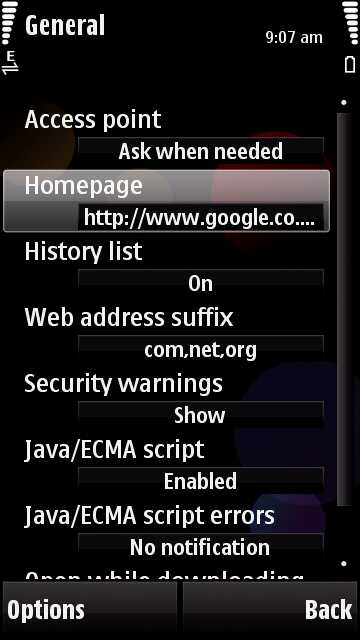
The default browser in Nokia 5230 is set to show the bookmarks page on startup.You can set it to your favourite search engine(for eg.google.com) by going to settings->general->homepage.
The virtual keypad becomes active in some java apps for eg gmail for nokia app.you can disable it by going to settings->application manager->installed applications->select application then select options and suite settings and set on screen keyboard to off.


The virtual keypad becomes active in some java apps for eg gmail for nokia app.you can disable it by going to settings->application manager->installed applications->select application then select options and suite settings and set on screen keyboard to off.

Saturday, October 16, 2010 0
02 October 2010
How To:Clear up Phone Memory
 Image by digitpedia via FlickrThe nokia 5230 has around 80mb phone memory of which 20mb will be already used.The memory doesn’t take long to fill up and you can get all sorts of problems like phone get’s slowdown or you can’t install an application from ovi store.Here are a couple of tricks that i found will be useful to free up your phone memory.
- Clear the web browser cache to release memory used by the cache (in web browser, select Options > Clear privacy data > Cache).
- If you have your own files stored in C: Phone memory, move them to E: Mass memory with File Manager application (to start File Manager, select Menu > Applications > Office > File mgr.).
- Check that the captured photos are not stored in phone memory (in Camera application, check Options > Settings > Memory in use).
- With File Manager application, check that there are no photos and music files stored in C: Phone memory.
- If you have applications installed in phone memory, remove the applications that are not needed, or move them to mass memory by removing and reinstalling the application (select Menu > Settings > Application mgr. > Installed apps. to check and uninstall the applications).
- With File Manager, check the folder Video clips in C: Phone memory and move the videos to E: Mass memory (e.g. home_screen.mp4 if it is there).
- If still low on the phone memory, change the messaging memory from C: Phone memory to E: Mass memory in Menu > Messaging > Options > Settings > Other > Memory in use. (Note that the messaging memory will switch back to C: Phone memory and you need to set this again if you connect the device to PC in Mass storage mode).
- The calendar entries, contacts and notes reside in the phone memory. Remove the objects which are not needed.
- If using Nokia Messaging email client (Nokia Email) and if there are a lot of messages in your mailbox, select that Headers only or Headers plus are by default downloaded to your device (to control the email download size, select in Nokia Messaging client Options > Tools > Settings > What to sync > Inbox > Email download size).

Saturday, October 02, 2010 3
28 September 2010
How To:Tips to extend battery life
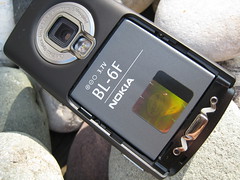 Image by Titanas via FlickrHere are some tips that you can use to extend the battery life of your phone which doesn't affect the usage of phone much
- If you are not on 3g set the default to gsm in settings->network->network mode
- stop bluetooth when you don't need it.
- use stock theme(including wallpaper)
- set display light time out to minimum
- while listening to music lock the phone this will considerably increase the battery life
- turn off autorotate,vibration
- minimise keytone

Tuesday, September 28, 2010 0
17 September 2010
10+ Tips and Tricks for Nokia 5230,5800,N97

1. Use Dialer and press # for about 2 seconds will switch the profile between Silent and General; press and hold 0 will open the web browser; press and hold 1 will open the voice mailbox
2. There is a shortcut key for Music, Gallery, Share, Video, Web shortcut at the top right corner just below the front camera
3. Press and hold the Green caller button when standby mode will activate the voice command. You could call the name from the contact or application name.
4. Organize your sms by grouping them like outlook by Messaging -> Option -> Setting -> Text message -> Other -> Show messages in groups -> Yes
5. Notification light will blink if there is unread sms/missed call. It could be turned off at Settings -> Notification light -> Off
6. If the touch input is not accurate, you could calibrate your screen at Touch Input-> Touch Screen Calibration -> ( Tap around the 4 dots at the corner)
7. Turning control functions:
a. Rotate your screen horizontal or vertical
b. Silence your phone for incoming call by rotate your phone with screen facing down.
c. Snooze the alarm by rotating phone screen facing down
8. Theme effect will give 3D and transition effect if on but will slow down your tube considerably. Settings -> Personal -> Themes -> General -> Themes effects -> On/Off
9. Shortcut to exit application : Press and hold the middle white button then press and hold the program that you wish to quit, an open/exit option will pop out (useful for those haven’t install handy taskman yet)
10. When using handwriting input, slide from left to right is Spacebar, right to left is Backspace
11. Organize your menu by Menu -> option -> organize. You could drag and drop the location of the application you wish to relocate.
Friday, September 17, 2010 0
16 September 2010
How to:Reset your phone
 Image by abulhussain via FlickrAs with any smartphone the Nokia 5230 tends to slow down with time as you install new applications and for reasons unknown.Their can be even extreme cases when the phone shows an error while opening gallery due to data corruption.Anyway the best way to solve this is to reset the phone.
Their are two types of resetting your phone
- Soft reset-It means that all your settings will be changed to default but all the data in phone memory will be safe including contacts.For this type*#7780# or goto settings->phone->phone management and restore factoy settings.
- Hard reset-Here all the settings and phone memory will be lost including contacts,messages so use it as last resort.You can either use *#7370# or switch on the phone by pressing call green+red+camera buttons.

Thursday, September 16, 2010 1
12 September 2010
How to:Search messages,notes,contacts,music,media and lot more with search
Ever wonder how you can search music or messages on nokia 5230.The built in search app does that and more.Search contacts,notes,music,images,videos and a lot more all at once.
The search app is locatd in internet folder.Enter the name of the item you want to search and walla instant search.
.jpg)
.jpg)
The search app is locatd in internet folder.Enter the name of the item you want to search and walla instant search.
.jpg)
.jpg)
Sunday, September 12, 2010 0
11 September 2010
How to:Connect to internet in ubuntu 10.04 using Nokia 5230 as bluetooth modem
The default bluetooth app just allows us to pair but has no option to start an internet connection in ubuntu 10.04.For this we have to download an app called blueman.This app allows us to create a dialup connection over bluetooth with the computer.
For installing goto synaptic package manager usually under system tab and search for blueman and mark and click full installation.
 Once the software is installed then icon will appear on the top panel.Click on the icon it will open a new window showing all the discoverable devices.Select your device right click and select dialup connection.
 Now the phone will be connected and you can right click networking icon and select new mobilebroadband connection.select your country,service provider or manually enter your access point(apn),username and password.Now you are all set.A gain click the networking icon and your connection name will be shown and once the connection is clicked you will be connected to internet.

For installing goto synaptic package manager usually under system tab and search for blueman and mark and click full installation.


Saturday, September 11, 2010 0
10 September 2010
How to:Listen to podcasts
Listening to your favorite podcasts has got a whole lot easier.Now you can listen to podcasts from the comfort of your home.Nokia podcasting application comes preinstalled on nokia 5800,nokia 5230,n97 and other symbian^1 devices.
 The nokia podcasting application is present on music folder in the main menu.There is abuiltin directory where you can see featured nokia podcasts,video podcats. Also the directory has international podcasts and pocast dicovery.There is also a search option.But we cant add a new url.
Once you have added the podcats it willbe shown in the podcats folder and you can update the list of latest podcasts.You can download the podcats to your phone and even preview it when you download.


Once you have added the podcats it willbe shown in the podcats folder and you can update the list of latest podcasts.You can download the podcats to your phone and even preview it when you download.
Friday, September 10, 2010 0
Subscribe to:
Posts (Atom)